Tuesday, July 27, 2010
Webinar Wednesday: Tech Tools for Learning
Register today for this week's Webinar Wednesday, "Tech Tools for Learning" (July 28, 12:15-1:00 p.m.) for a tour of technology tools to help you succeed in distance learning courses. Topics covered will include iTunesU, Google Calendar and Atomic Learning. ELI webinars are free but you need to register in advance. Visit here to sign up!


Sunday, July 25, 2010
Payment for fall classes due Friday!
Heads up! If you registered for fall courses and haven't submitted your tuition payment yet, you must do so by Friday, June 30 at 5 p.m. to avoid being dropped from your courses! If you have questions about payment, visit NOVA's Fall 2010 payment
information here.
You can also call the ELI Hotline at 703-323-3347 for assistance.
Of course, there's still plenty of time to register for fall if you haven't done so already! ELI's first fall session starts August 23 and for many courses, additional sections are offered starting September 13 and October 4. Just remember that if you register for fall courses on Friday or thereafter, your payment is due by 5 p.m. the next business day.
Of course, there's still plenty of time to register for fall if you haven't done so already! ELI's first fall session starts August 23 and for many courses, additional sections are offered starting September 13 and October 4. Just remember that if you register for fall courses on Friday or thereafter, your payment is due by 5 p.m. the next business day.
Saturday, July 24, 2010
Washington Mystics host NOVA Night!

Ready for some back to school fun? The Washington Mystics will host NOVA Night on Friday, August 20. Discounted tickets are available to NOVA students if ordered in advance.
Washington Mystics vs. New York Liberty
Fri., August 20, 7 p.m. - Verizon Center
- $20 lower-level tickets (a $15 savings) for fans who mention the NOVA Group offer.
- NOVA will be recognized on the arena's video board during halftime!
Friday, July 23, 2010
Library Resources Tip #7: LearningExpress
Looking for a productive way to procrastinate? Try brushing up on your skills with LearningExpress. This suite offers practice tests, exercises, skill-building courses, and other information for all age levels in a variety of areas. Need to refresh your reading, writing, or math skills? Check out Skill Building for Adults. Considering a career move? The Job Search and Workplace tools can help you improve your business writing skills, create a well-written cover letter and resume, and ace an interview.
LearningExpress is easy to overlook amidst the multitude of other resources at NOVA's Library Website. If you're looking for more gems like this, click on "Articles & More" and then go to the "Encyclopedia's, Dictionaries & Reference" section.
LearningExpress is easy to overlook amidst the multitude of other resources at NOVA's Library Website. If you're looking for more gems like this, click on "Articles & More" and then go to the "Encyclopedia's, Dictionaries & Reference" section.
Thursday, July 22, 2010
NOVA Tip: Request your transcript online
As another semester winds down, visiting or transient students often have questions about how to transfer the credits they completed at NOVA back to their home institution. It's easy! You can request transcripts online through NOVAConnect and expect a two-day turnaround time. Check here
for detailed instructions.
Wednesday, July 21, 2010
Keeping track of life
As I get caught up in my summer activities, with vacations, changes in my work schedule, and other unexpected events popping up, my life is anything but routine. The cues that I have during other times in the year that remind me what day of the week it is and what has to be done on that day are all out of sync. I often need to find other ways to remember details like when my assignments are due or when tests need to be taken. This has led me to explore new ways to remember the things I have to do.
One of the first things I tried out was the calendar on my cell phone to set reminders for important events. If I also set a reminder the Monday of the week an important assignment is due, I find that I then manage to make plenty of time to work on it that week. Unfortunately, this only works when my phone is both on and charged—two things I often forget to take care of. The next method I discovered was a way to forward my mail from my student email account to my main address, so I can I receive any announcements from my teachers as quickly as possible.
Finally, while I was logged into my student email account to forward the mail, I noticed that I have access to Google’s Calendar program there. Although I have Outlook at work, I don’t have it at home, so I decided to use the Google Calendar as a way to remind myself of deadlines and events when working from my home computer. And with Google Calendar, I can set reminders for the events that will be sent to me by email, which will be forwarded to my personal account too, so that gives me an additional failsafe to make sure I don’t miss a deadline.
Here are the directions on how to forward mail from your student email account:
One of the first things I tried out was the calendar on my cell phone to set reminders for important events. If I also set a reminder the Monday of the week an important assignment is due, I find that I then manage to make plenty of time to work on it that week. Unfortunately, this only works when my phone is both on and charged—two things I often forget to take care of. The next method I discovered was a way to forward my mail from my student email account to my main address, so I can I receive any announcements from my teachers as quickly as possible.
Finally, while I was logged into my student email account to forward the mail, I noticed that I have access to Google’s Calendar program there. Although I have Outlook at work, I don’t have it at home, so I decided to use the Google Calendar as a way to remind myself of deadlines and events when working from my home computer. And with Google Calendar, I can set reminders for the events that will be sent to me by email, which will be forwarded to my personal account too, so that gives me an additional failsafe to make sure I don’t miss a deadline.
Here are the directions on how to forward mail from your student email account:
- To forward all emails sent to a student email account to a personal email address, log into your student account.
- Then click where it says Settings in the upper right corner of the screen.
- Then select Forwarding and POP/IMAP from the top row of the menu.
- Select the Forward a copy of incoming mail to:
- Enter the email address you want the mail forwarded to, and then select the Save changes button at the bottom of the screen.
Tuesday, July 13, 2010
New ELI Courses for Fall
We at ELI continue to expand our course offerings to give you more choices that meet your needs. Here's a list of new and interesting courses that you might consider adding to your FA'10 schedule:
- ADJ 111: Law Enforcement Organization and Administration I
- ART 115: Current Issues in Web Design
- ART 141: Typography I
- BUS 265: Business Ethics
- CHD 119: Introduction to Reading Methods
- CHD 146: Math, Science and Social Studies for Children
- CHD 164: Working with Infants and Toddlers in Inclusive Settings
- CSC 110: Introduction to Computing
- ENG 210: Advanced Composition
- GIS 205: Geographical Information Systems: 3-Dimensional Analysis
- HIM 130: Healthcare Information Systems
- HIM 141: Fundamentals of Health Information Systems I
- LGL 235: Legal Aspects of Business Organizations
- SOC 201: Introduction to Sociology I
- SPA 163: Spanish for Health Professionals I
- VET 131: Clinical Pathology I (with lab)
- VET 235: Animal Hospital Management and Client Relations
Saturday, July 3, 2010
Problems with Bb9 Equation Editor? Try this...
ELI students in Physics, Chemistry and Math courses have reported problems using the Equation Editor in Blackboard 9 to complete their assignments and exams. ELI's Instructional Design team has investigated the situation and here we present the recommended work-around. (click any image to enlarge)
First, note the icons and tools in the image of the text box below:

To write an equation in the text box:


Using the Equation Editor in BB9
First, note the icons and tools in the image of the text box below:
- Visual Text Editor is ON
- Click triangle to reveal second toolbar
- See the Equation Editor icon
- See the Preview icon

To write an equation in the text box:
- Click on the Equation Editor icon – a pop-up window will open.
- Click and scroll across the gray buttons to select the type of equation you want to create.
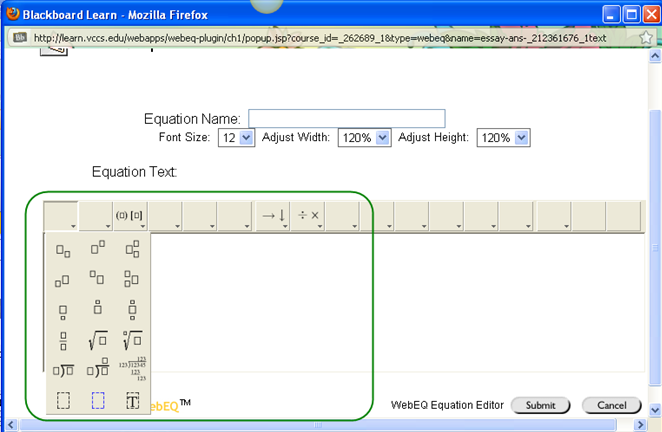
- Create the equation and then click the Submit button:

- The equation will appear as an empty box (as shown below).
- Click on the Preview button to see/verify the equation.
- Close the Preview window and continue with the test or assignment.
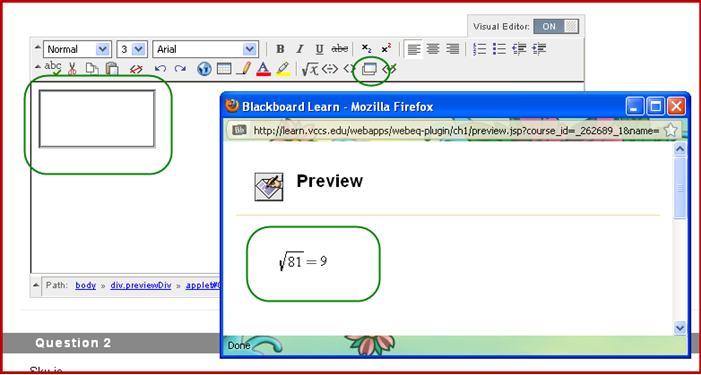
Note: If you need to delete an equation, click on the center of the empty box and use the delete key on the keyboard.
Subscribe to:
Comments (Atom)