Showing posts with label textbooks. Show all posts
Showing posts with label textbooks. Show all posts
Monday, June 3, 2013
NOVA’s Textbook-Free Courses Make Headlines
This fall, Northern Virginia Community College will offer a series of 12 general education courses that do not require students to purchase textbooks or other course materials. These textbook-free classes will all be offered online through NOVA’s Extended Learning Institute (ELI) and will use free open educational resources (OER). The courses can be taken individually, or as a series to satisfy the requirements for the General Education Certificate. In lieu of traditional textbooks, all readings and materials used in the courses will be available to students free of charge online or through Blackboard – NOVA’s course management system. OER materials include teaching, learning, and research resources that are in the public domain or are released under a licensing agreement that permits their free use or repurposing by others. Read more about how ELI’s OER-Based General Education project will save NOVA students money in Community College Week.


Tuesday, January 8, 2013
Using Financial Aid for Textbooks
Ordering books from the bookstore can be a daunting prospect if you have never done it before. But really, the procedure is fairly simple. You can order the textbooks you need online and pay for them using your Financial Aid award any time between now and February 1, 2013.
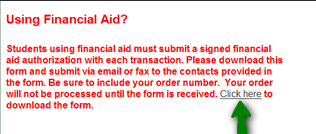
To obtain your books this way, go online to the ELI Bookstore, order your textbooks/ supplies, then check out. When you come to the screen where you can choose a payment method, first look above it for a paragraph in red (shown below). Read the paragraph and use the link labeled “Click here” to download an authorization form. You will need to complete this form and email or fax it to the fax number or email address listed on the form.
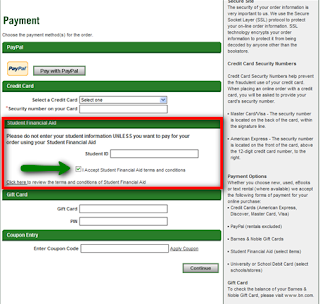
Then, in the Payment section, look for the Student Financial Aid option. Enter your student ID number and check the box next to “I Accept Student Financial Aid terms and conditions.”
To figure out how much you can purchase using Financial Aid, look at the amount you were awarded and have ACCEPTED for this semester. Subtract your tuition from this amount. The remaining amount is what you can use for purchases from the bookstore. Shipping costs can also be covered by your financial aid if you have enough.
If your textbooks and supplies cost more than your available financial aid, remove some items from your cart until the total plus shipping is less than or equal to your remaining available financial aid. Then order the rest of the supplies that you need in a different order and pay for them by whatever other method you wish to use.
To obtain your books this way, go online to the ELI Bookstore, order your textbooks/ supplies, then check out. When you come to the screen where you can choose a payment method, first look above it for a paragraph in red (shown below). Read the paragraph and use the link labeled “Click here” to download an authorization form. You will need to complete this form and email or fax it to the fax number or email address listed on the form.
Then, in the Payment section, look for the Student Financial Aid option. Enter your student ID number and check the box next to “I Accept Student Financial Aid terms and conditions.”
To figure out how much you can purchase using Financial Aid, look at the amount you were awarded and have ACCEPTED for this semester. Subtract your tuition from this amount. The remaining amount is what you can use for purchases from the bookstore. Shipping costs can also be covered by your financial aid if you have enough.
If your textbooks and supplies cost more than your available financial aid, remove some items from your cart until the total plus shipping is less than or equal to your remaining available financial aid. Then order the rest of the supplies that you need in a different order and pay for them by whatever other method you wish to use.
Wednesday, May 2, 2012
Buying Books with Financial Aid
Ordering books from the bookstore can be a daunting prospect if you have never done it before. But really, the procedure is fairly simple. You can order the textbooks you need online and pay for them using your Financial Aid award any time between now and May 27, 2012.
To obtain your books this way, go online to the ELI Bookstore, order your textbooks/ supplies, then check out. When you come to the screen where you can choose a payment method, first look above it for a paragraph in red (shown below). Read the paragraph and use the link labeled “Click here” to download an authorization form. You will need to complete this form and email or fax it to the fax number or email address listed on the form.
Then, in the Payment section, look for the Student Financial Aid option. Enter your student ID number and check the box next to “I Accept Student Financial Aid terms and conditions.”
To figure out how much you can purchase using Financial Aid, look at the amount you were awarded and have ACCEPTED for this semester. Subtract your tuition from this amount. The remaining amount is what you can use for purchases from the bookstore. Shipping costs can also be covered by your financial aid if you have enough.
If your textbooks and supplies cost more than your available financial aid, remove some items from your cart until the total plus shipping is less than or equal to your remaining available financial aid. Then order the rest of the supplies that you need in a different order and pay for them by whatever other method you wish to use.
Friday, December 17, 2010
Buying Textbooks and Supplies for your ELI Class
 You can now order Spring semester books online and pay for them by credit card or by using your Financial Aid award. To obtain your books, go online to the Alexandria campus bookstore.
Subscribe to:
Posts (Atom)