Showing posts with label NOVA tips. Show all posts

Thursday, January 23, 2014

Free NOVA Shuttle Service


All aboard….the NOVA Shuttle!  The free NOVA Shuttle is available to NOVA students.  The long awaited shuttle will provide routes between some Metro stations and NOVA campuses.  To enhance campus accessibility for our students, the shuttle will run between the Alexandria Campus, Arlington Center, Annandale Campus, Workforce Development Center (located on 7630 Little River Turnpike, Annandale) and the nearby Metro stations to include: Dunn Loring, Braddock Road, and Ballston Metro. 

The shuttle will operate Monday through Friday from 7:30 a.m. to approximately 6:00 p.m.
All NOVA students, staff or faculty can ride for FREE with their NOVA ID Card.  (You must show your ID to ride the NOVA Shuttle.)
Drop-Off/Pick-up Locations (If you need to check Metro schedules, please click here.)
  • Annandale Campus - Metrobus stop on Lake Road.
  • Workforce Development - 7630 Little River Turnpike, Annandale, VA - On the side of the building facing Little River Turnpike.
  • Dunn Loring Metro Station - Prosperity Ave, Bus Bay 1B.
  • Alexandria Campus - In front of the Bisdorf Building
  • Arlington Center - In the cul-de-sac
  • Ballston Metro Station - Fairfax Drive outside of the main entrance
  • Braddock Road Metro Station - Kiss and Ride
For more information, please click here! 

Monday, December 23, 2013


Northern Virginia Community College is closed for the Winter Break
We will reopen on Thursday, January 2, 2014

If you have common questions, the following information may be helpful:
Grades: Fall 2013 grades will be accessible through your NOVA Connect.  Grades are posted within 7 days following the last day of class.
Blackboard Course Availability: If you are visiting Blackboard to access your Spring 2014 class, it will not be available in Blackboard until the first day of class (some classes may be available one-two days before the start date). 
Course Start Dates: 1st 16 week, 1st 8 week, 1st 12 week  and 1st 4 week (MTT only) sessions will begin on January 13, 2014.
Registration: If you have not registered, Spring 2014 registration is underway.  Although the College is closed, online registration is open. For registration information, please click here.  Additional step by step registration instructions can be viewed by clicking here.  If you need assistance with your course selection, ELI Counselors will be available at, elicounselors@nvcc.edu, when we reopen on January 2, 2013. Emails will be answered in the order they are received. 
Pre-requisites Satisfied at Another College:
If you are attempting to enroll in a course at NOVA for which you believe you have successfully completed (a grade of “C-“or higher) the required pre-requisite(s) at another regionally accredited institution, you will need to submit a copy of your unofficial transcript to an ELI counselor for review.  Using your NOVA email, please send an email to the counselors at: elicounselors@nvcc.edu.  Please include the following information with your unofficial transcript:

-       NOVA seven digit student identification number (EMPLID)
-       The specific course that you are registering for (Example: ENG 111 E55N, #45689)
-       Your telephone number 
Requests are reviewed and processed in the order in which they are received.  You should expect to receive a response about your request within three business days after we re-open.  
Promote Your Success: Online Academic Resources: If you have any downtime during the break, it would be an excellent opportunity to explore the free online workshops offered by Student Lingo.  Student Lingo workshops focus on time management, career development, mastering the job interview, resume writing, stress management techniques, writing techniques, study skills, test anxiety and more!  They are an excellent resource that will enrich your academic and career growth. 
We wish you a safe and restful holiday break!

Wednesday, August 28, 2013

NOVA Alert: Be Informed-Sign Up Now!

Are you signed up for NOVA Alert?


Whether it's a hurricane, snowstorm, earthquake or critical announcement, NOVA Alert will keep you informed!

NOVA Alert provides notices of college closures and other critical time-sensitive information to subscribers with digital devices. Signing up for NOVA Alert (http://alert.nvcc.edu) is easy and only takes a few minutes.


Sign Up Today and Be in the Know with NOVA Alert!

Friday, June 28, 2013

Outside Northern VA? Allow extra time for Proctor Request Forms


As an ELI or distance learning student, you will be required to take proctored exams. There are several ways to do this. The first, and most common way, is to take your exams at one of the six campus testing centers. A link to the Testing Center Calendar featuring the hours of operation for each, is located on the main ELI webpage.

One alternative for students, who are located outside of the service area of the campus testing centers, is to request a proctor using a Proctor Request Form. The link for the form also appears on the main ELI webpage under Announcements. Please be sure to read the form carefully and submit it in a timely manner. It takes 3-5 business days for these forms to be processed so, don't wait until the day before the test!

A third way to take tests that is course-specific is called Proctor U. ProctorU, an online proctoring service, is available for select courses for a fee of $7.50 per exam. To see if your course has the ProctorU service as an option, please check the Exams and/or Announcements pages of your Blackboard course, or ask your instructor. You must be 18 or older and meet minimum technical system requirements to use ProctorU. The specific requirements are listed on the ProctorU website.

Wednesday, March 6, 2013

Are You Ready For A Snow Day?


Staying informed will allow you to plan accordingly and stay safe! NOVA makes it easy for you to stay up-to-date in the event of an emergency or inclement weather.

If the College is closed or delayed due to an emergency or inclement weather, a text alert will be sent to cell phones registered on NOVA Alert, a notice will be posted on the home page of the College’s website, and a message will appear on our cable television station (channel 19, 25, 37 or 59 – check your local listing) as well as several local radio and television stations. The College uses several media sources to announce delays and closings. These may be found on our website under “Emergency Preparedness: Closing Information.”

Keep in mind, even when the college is closed, you can still log into Blackboard to access your ELI courses. To find out if a closure or delay will affect your ELI course, check Blackboard for announcements from your instructor.

Thursday, February 28, 2013

Creating a Healthy Email Perception


Technology use has become more prevalent in the last decade and with help from the Internet, students have been able to attend class’s right from the comfort of their own home.  Although technology has opened up many doors to help aid students in their educational goals it has also presented challenges with communication in the online classroom.

Formulating a well-structured email is crucial in distance learning as it builds not only on your relationship with your instructor but also is an essential skill that all students and faculty should develop.   There is less confusion and distress when email communication is organized and professional.

Here are some tips that can encourage healthy and efficient email communication.


- Express the main content in your email by utilizing the Subject Line.  Your subject will indicate what your email correspondence entails.  Also, developing a strong title can be perceived as a quick summary and allows preparation for your reader.

- Choose a friendly Greeting.  Opening your email with “hello” or “good evening” is always a pleasant gesture.

- Be mindful of the Font you select.  Calibri and Arial are both simple selections that prevent challenges for those with sensitive vision.

- Try not to use extreme colors such as red.  Selecting a neutral Color such as blue is a gentle way to highlight specific points in your email.

- Always present yourself Professionally.  Writing in text message lingo is casual and lacks a sound composure.

- Never write in Caps Lock.  Capitalizing all letters in a word or sentence displays aggression and has high risks of offending your reader.

- Discuss if a Response is needed.  Requesting feedback clarifies that your email is not just information but an open discussion.

- Review your email, perhaps by reading it out loud or asking a friend to read it.  Since no two people are alike, achieving a balanced perception is vital.


Keep in mind that writing proper emails is an ability that everyone can learn and practice.  Furthermore, reading email communication is equally as important.  Email perception is a delicate matter that both instructor and student can work to interpret with fair approaches.

To read up more on this subject, visit Here .
 

Tuesday, January 8, 2013

Using Financial Aid for Textbooks

Ordering books from the bookstore can be a daunting prospect if you have never done it before. But really, the procedure is fairly simple. You can order the textbooks you need online and pay for them using your Financial Aid award any time between now and February 1, 2013. 

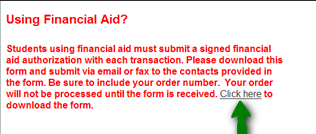
To obtain your books this way, go online to the ELI Bookstore, order your textbooks/ supplies, then check out. When you come to the screen where you can choose a payment method, first look above it for a paragraph in red (shown below). Read the paragraph and use the link labeled “Click here” to download an authorization form. You will need to complete this form and email or fax it to the fax number or email address listed on the form.


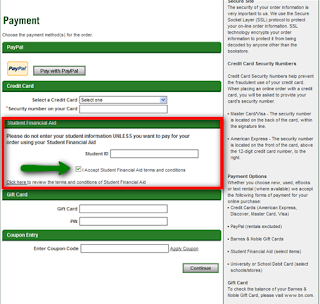
Then, in the Payment section, look for the Student Financial Aid option. Enter your student ID number and check the box next to “I Accept Student Financial Aid terms and conditions.”


To figure out how much you can purchase using Financial Aid, look at the amount you were awarded and have ACCEPTED for this semester. Subtract your tuition from this amount. The remaining amount is what you can use for purchases from the bookstore. Shipping costs can also be covered by your financial aid if you have enough.

If your textbooks and supplies cost more than your available financial aid, remove some items from your cart until the total plus shipping is less than or equal to your remaining available financial aid. Then order the rest of the supplies that you need in a different order and pay for them by whatever other method you wish to use.

Thursday, December 13, 2012

Ordering Your Official NOVA Transcript

As the fall semester comes to a close, many students wonder how to transfer the classes they just finished to another school. Other students who have received tuition assistance from an employer may need a transcript to verify that they successfully completed their class. An official transcript can help in both instances. Luckily, it's easy to order one online. Here's how...
  1. Log into My NOVA 
  2. Click on VCCS SIS:Student Information System
  3. Scroll down to Academic Records
  4. Click on 'Request Official Transcript'.
  5. Enter the requested information to order your official transcript.
If you have finished all of the classes you intend to take at NOVA, you may want to order an extra 'sealed' copy to keep in a file. That way, if you ever need to verify your education at NOVA, you can do so without having to wait for a transcript to be mailed to you. Then, when you use your sealed copy, you can just order a replacement without any time pressure.  For complete instructions on ordering your transcript, please click here.

Congratulations to everyone who successfully completed classes this semester!

Tuesday, February 7, 2012

Success Webinar

Would you like to learn some tips and strategies for being successful in distance learning courses?  If you answered yes to this question you may be interested in participating in the following webinar:

Strategies for Success in Distance Learning Courses Webinar, Wednesday, February 8,  12:15 pm – 1:00 pm.

This 45 minute webinar for NOVA students will focus on strategies for success in distance learning courses offered through ELI.  Topics covered will include study skills, tutoring/support services, and time management.  The webinar is free, but registration is required.  Register online at http://bit.ly/A0gdBz. 

Thursday, January 26, 2012

Be in the Know: Forward your NOVA E-mail to Personal E-mail

To forward your student emails to another account, follow these steps:
  1. Log into your student email account by logging into MY NOVA and selecting your student email from the list of choices
  2. Then click the "gear icon" in the upper right corner of the screen and click on Mail Settings
  3. Then select Forwarding and POP/IMAP from the top row of the menu
  4. Select the Forward a copy of incoming mail to:
  5. Enter the email address you want the mail forwarded to
If you run into any difficulty, feel free to email a Success Coach for help: ELISuccess@nvcc.edu

Thursday, January 19, 2012

Inclement Weather - Late Opening or Early Closing Policies

Earlier this week, we provided you with useful links and information regarding NOVA’s inclement weather policy. To clarify, if the college is not closed and we have a late opening or early closing, please view the policy below:

Northern Virginia Community College will open X hour(s) late. - The College’s official opening time is 8:00 a.m. Delay example: a two-hour delay means that the College will open at 10:00 a.m. Classes that begin at 10:00 a.m. or later will be held as usual. College employees should arrive at the College by 10:00 a.m. Supervisors of employees who work special shifts should make clear how delayed openings affect attendance expectations. To avoid confusion, we try to provide the actual time of opening.

Morning classes at Northern Virginia Community College are canceled. - The College will be
closed until noon. The College will open at 12:00 p.m. and classes beginning at 12:00 p.m. or later will be held as usual. College employees should arrive at the College by 12:00 p.m.

Day classes at Northern Virginia Community College are canceled. - Day classes are those classes that begin before 4:30 p.m. Classes that begin at 4:30 p.m. or later will be held as usual. Employees whose normal work schedules extend beyond 6:00 p.m. should report to work by 4:30 p.m.

Evening classes at Northern Virginia Community College are canceled. - Evening classes are those classes that begin at 4:30 p.m. or later. The College will close at 4:30 p.m. and no further classes will be held until the next morning.

Monday, August 22, 2011

Be Prepared and Participate in Class!


New students are often surprised to find out that college is not what they thought it would be. Unlike scenes from Animal House, there are expectations and demands present everywhere you turn. It is not enough to be present in college physically – even if you are a virtual student; you must also be present mentally. If you want to get the most out of your class, you have to participate! Here are some other hints:

• Successful students purchase all the required materials (this means textbooks)

• Successful students are aware of deadlines and complete assignments & tests by the due date

• Successful students pay attention and take notes

• Successful students participate in discussions and ask questions

If you take these suggestions, you might just find that your class becomes a little easier. Do you have any other suggestions for students? For more tips contact ELI’s Student Success Coaches at elisuccess@nvcc.edu.

Wednesday, May 18, 2011

NOVA Tip: Earn credit for non-traditional experiences

Have you developed extensive skills outside of the classroom from work, hobbies, professional activities or other non-traditional experiences?  Did you know that NOVA offers the opportunity to earn credit or advanced standing for some of these skills? Check out all the intriguing ways to EARN NOVA CREDIT for your experiences outside of the classroom here:  College Credit through Advanced Standing Manual.  This manual gives detailed information on the following:
  • Transfer credit process
  • Credit-by-exam opportunities
  • Credits earned in non-traditional programs
  • ….and more!
Many students have already used these policies at NOVA to get one step closer to graduation. What questions do you have about earning credit for what YOU have accomplished outside of the classroom? Direct your questions about earning credit for non-traditional learning experiences to Katie Smith, ELI Counselor/Prior Learning Specialist, or post a comment here.

Thursday, October 21, 2010

NOVA Tip: Check the NOVA Events Calendar

Every week, a variety of fun and interesting events are offered at each NOVA campus, from workshops, info sessions and seminars to performances, games and charity drives. A sampling of a few upcoming events is below but be sure to check the NOVA Events Calendar regularly for the full list by category and location.
Also, we'll be posting weekly events at each campus every Monday starting next week. Stay tuned.

Tuesday, October 5, 2010

White House Summit on Community Colleges

Today is an important day for community colleges. Dr. Jill Biden, (herself a full-time English faculty member at NOVA) will chair the first-ever White House summit on community colleges. The summit will bring together community college administrators, students and stakeholders from around the country to discuss innovative ways to ensure that community college students are gaining the skills and knowledge they need to be successful in the workforce. You can participate by watching a live webcast (tune in for the opening session at 12:15pm and the closing session at 3:00pm) and by submitting your thoughts, questions and challenges for discussion as part of the dialogue.

Friday, August 20, 2010

Social Networking with NOVA

Are you a social networker looking for more ways to connect with NOVA? You can keep up with the College buzz by becoming a NOVA Facebook fan or Twitter follower. You can also find NOVA podcasts on iTunesU and watch NOVA's own YouTube channel, NOVAaccess. And ELIfe is only one of many blogs on the NOVA scene! For links to all of NOVA's social media sites, visit www.nvcc.edu and find the boxed section, "Connect with NOVA."

Wednesday, August 11, 2010

Testing Center Tips for Summer Students

NOVA's Testing Centers and ELI want to do everything possible to help you be successful in the completion of your summer ELI courses. With that in mind, here are some “tips” help you plan better and insure a fiasco free testing experience.
  • Check your course syllabus for the end date or the last day you can take exams for each class. Not all students begin or end at the same time; it depends on your registration date. Additionally, your instructor may require you to complete a certain number of exams by alternate deadlines.
  • Do not wait till the last minute to test, especially if your test is on-line. Frequently, there is a waiting list for a computer on the last day. Sometimes, but not often, there are Internet issues. It is strongly recommended that you arrive a minimum of 2 hours prior to closing to allow for test setup and student lines.
  • Avoid taking multiple exams on the same day. Just because you are inside the Testing Center, you will not be guaranteed a computer or a seat. And you will have to go to the end of the line for each exam.
  • Your test pass must be completely filled out before you arrive, or you will lose your place in line. This post shows how to access your exam passes.
  • In order to take any test, you must present a current photo ID and a Student ID number. Acceptable forms of ID include driver's license, NOVACard, passport, personal ID from the DMV, military ID or green card.
  • Check the website for current hours and remember that you must be checked in 90 minutes prior to closing to receive a test. Hours are posted here.
Refer to Test-Taking 101 for more tips to help you succeed. Good luck!

Thursday, July 22, 2010

NOVA Tip: Request your transcript online

As another semester winds down, visiting or transient students often have questions about how to transfer the credits they completed at NOVA back to their home institution. It's easy! You can request transcripts online through NOVAConnect and expect a two-day turnaround time. Check here for detailed instructions.

Tuesday, June 22, 2010

NOVA Tip: Learning Communities

Do you ever wish your instructor knew just how much work was required in another course you are taking? Or do you wish that you could take advantage of the concepts learned in one course by applying them to another course and get credit for it? Then you might consider enrolling in a Learning Community.

Learning Communities (LCs) are a group of linked classes in which the same group of students take two or more classes together. Students who enroll in the linked courses work together with faculty on shared assignments and learning opportunities. LCs are offered on each NOVA campus every semester, including ELI. Check the list of FA'10 LC offerings and enroll in one today. It might make completing two required courses for your degree or certificate a little more manageable--and enjoyable!